Researcher Reveals Clickjacking Flaw That Can Spill Your Secrets
By: Jim Stickley and Tina Davis
January 6, 2026
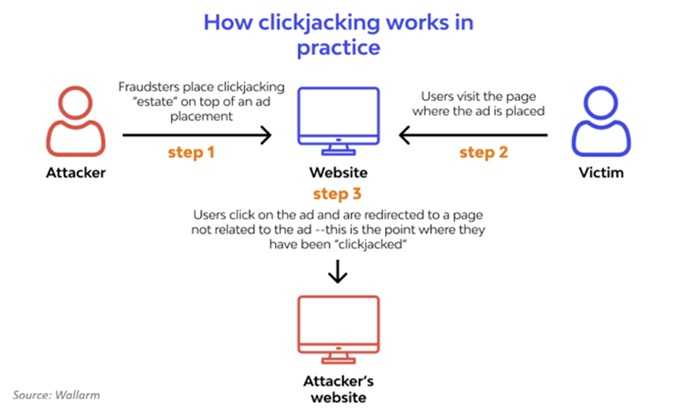
Password managers are, while not the best way, not a bad way to store all the numerous passwords you need to have these days. However, some of the confidence in that was recently tested. At the most recent DEF CON conference, independent security researcher Marek Tóth dropped a bombshell—your trusty password manager may not be as secure as you think. Tóth showed how a sneaky attack called DOM-based extension clickjacking can trick your browser into autofilling not just usernames and passwords, but even your 2FA codes, passkeys, credit card details, and personal info—all with a single click.
Here’s what’s up:
- Attackers build a website that looks harmless—maybe with a cookie pop-up or a login banner. But hidden beneath are invisible password manager controls. One careless click and bam—your autofill info gets sent straight to the bad guys.
- Tóth tested 11 browser-based password managers and found all of them exposed—at least initially. That includes big names like 1Password, Bitwarden, Enpass, iCloud Passwords, LastPass, and LogMeOnce.
- Usernames, passwords, credit cards, 2FA codes, passkeys—you name it, it can be snatched with a single click.
What you should do now:
- Turn off autofill in your password manager and swap to copy-and-paste for logins. Yes, it’ll take a bit longer, but it’ll also keep your login information safe for now.
- If you're on a Chrome browser, change your password-manager extension’s site access to “on-click” only, so it only activates when you give it the go-ahead.
- Keep your extensions updated—some companies have already patched the flaw; others are still working on fixes. So when you see the update notification, get right on it.
Until all apps are patched, stay sharp—one click shouldn’t cost you your data.

 SUBSCRIBE TO WEEKLY NEWSLETTER