
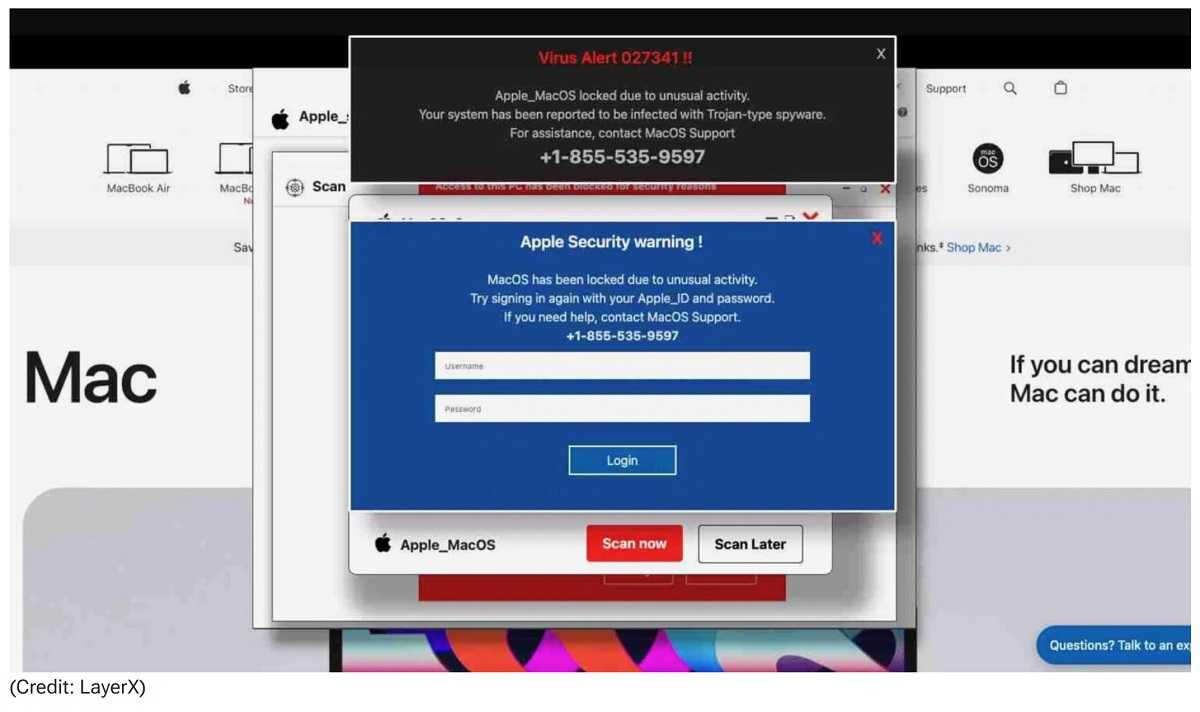
A scareware attack is targeting Mac users, tricking them into believing their computer has been locked by Apple. Cybercriminals use a browser-based pop-up scam that mimics Apple’s official "Find My Mac" lock screen. Researchers at LayerX Labs have been tracking this for a while now. For this ruse, a fake lock screen appears after users visit compromised or malicious websites, creating panic and pressuring them into taking immediate action.
How the Attack Works
1. Fake Lock Screen – Users stumble upon a fake website, often by making typos in the URL. The screen displays a full-screen message that appears to be from Apple, stating that the device has been locked for security reasons.
2. Fraudulent Contact Information – The pop-up includes a phone number, instructing the victim to call Apple Support (which is actually a scammer). However, the number goes unanswered, even when calling between the so-called business hours.
3. Extortion Tactics – The frozen screen claims malware is installed and requests the Apple ID username and password info…which, as you guessed, goes to the scammers.
How to Avoid Being a Victim
- Force Quit the Browser – If you see this pop-up, don’t panic. Press Command + Option + Esc to open Force Quit and close the browser.
- Never Call the Number – Apple does not lock Macs via a browser warning or request payments over the phone.
- Clear Browser Cache – Restart your Mac and clear your browsing data to prevent the scam from reappearing.
- Enable Scam Protection – Keep macOS updated and use Safari’s, or other browser’s, built-in fraud warning to stay protected.
- Keep OS and Software Updated – Always keep your devices updated with the latest security patches and updates.
Don’t fall for this scam—Apple doesn’t lock Macs this way, and real security warnings don’t demand money!
For banks and credit unions
Share this article with your members
Copy a ready-made summary and link for your newsletter, website or social posts.