Who can you trust these days? Sadly, it’s getting more and more difficult to be sure. However, there are plenty of trustworthy cybersecurity researchers out there, such as those at Kaspersky. They found a mobile trojan just hanging out in the official app stores for the most popular smartphones just waiting to steal all of your photos. And it’s been out there hunting since February of 2024.
2
SparkKitty is a mobile trojan that targets both Android and iOS devices. It’s a follow-up to Kaspersky’s earlier warning about SparkCat spyware.
2
There are two places where SparkKitty can be found lurking. Official app stores is one such location. On Android, it snuck into a messaging app called SOEX (with crypto features) and was downloaded over 10,000 times from Google Play. On iOS, it hid in an app called ?coin on the App Store.
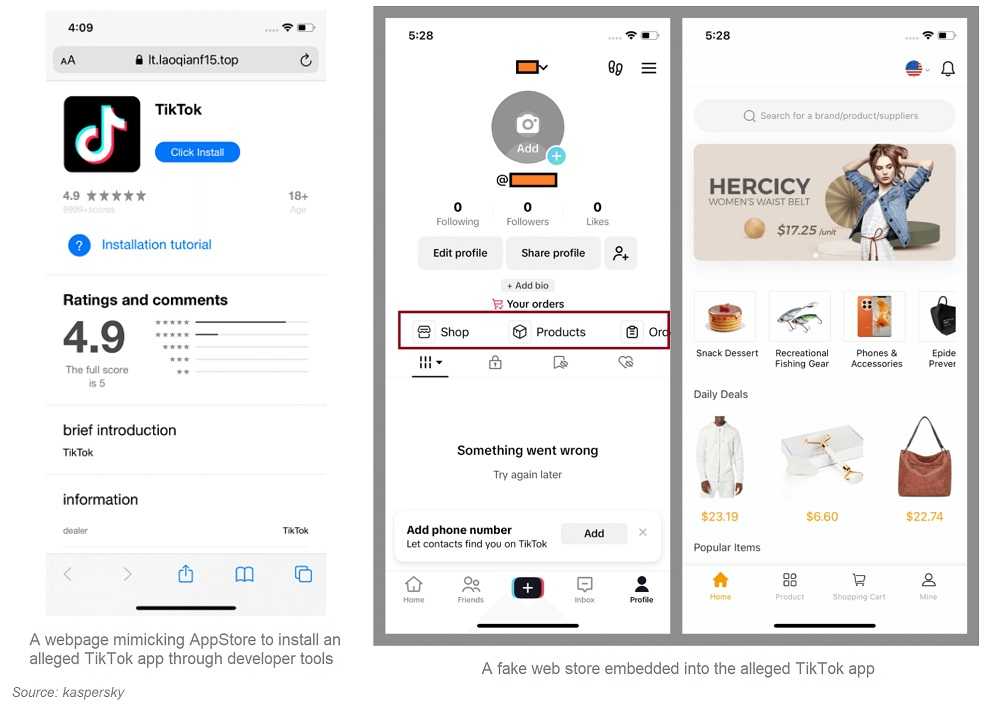
The second way they can sneak in is via unofficial sources. These are spread via modded TikTok clones, fake gambling, adultgame apps, and scam sites. On iOS, infection occurs when the user sideloads apps; i.e. they download them via sources that are not the official stores. On Android, it's embedded directly in Java/Kotlin apps, some using malicious Xposed modules.
2
As mentioned previously, it can steal your photos. It can also:
- Request photo storage permissions.
- Automatically upload existing and newly added images to a Command and Control (C2) server.
- Hunt for crypto wallet seed phrase screenshots using OCR, but also grab all personal photos—raising risks of extortion.
2
- Only install trusted apps, avoid unknown or low rated apps and review external sources.
- Never sideload apps or use enterprise profiles from unofficial websites.
- Limit app permissions: Be skeptical of photo access requests. Ask yourself if the app really needs it?
- On Android, enable Google Play Protect and consider reputable antivirus tools. Keep those AV tools updated.
- On iOS, be mindful of provisioning profiles and avoid apps requiring gallery access.
- Avoid screenshots of seed phrases for cryptocurrency—store recovery phrases offline (on paper, in a secure place).
While the app has been removed from the GooglePlay Store and the developer banned from adding apps, Apple had not removed it as of writing. Though the official stores are still the safest places to get your apps, SparkKitty shows that even official app stores aren’t infallible.
For banks and credit unions
Share this article with your members
Copy a ready-made summary and link for your newsletter, website or social posts.