Coruna Exploit Could Open Your iPhone to Hackers
By: Jim Stickley and Tina Davis
June 15, 2026
You probably think of your iPhone as one of the safest devices around. In many ways it is, but security researchers recently uncovered a powerful exploit framework called Coruna that shows even strong defenses can have cracks.
Not just one flaw
Coruna isn’t a single vulnerability. Instead, it’s a collection of 23 separate exploits woven into five attack chains. Security researchers say the toolkit targets weaknesses in the Safari browser and other parts of iOS. By linking multiple vulnerabilities together, attackers can slip past several layers of Apple’s built-in protections and gain unusually deep access to a device.
What hackers could grab
Once the exploit is triggered, a hacker could potentially collect sensitive information from an infected phone. That may include photos, files, saved login credentials, and even cryptocurrency wallet data. In some cases, malicious software tied to Coruna can also scan a device for financial information or recovery phrases used to restore digital wallets.
Needless to say, yet we’re saying it anyway, that kind of access could spell trouble for anyone storing valuable data on their phone.
Where it came from
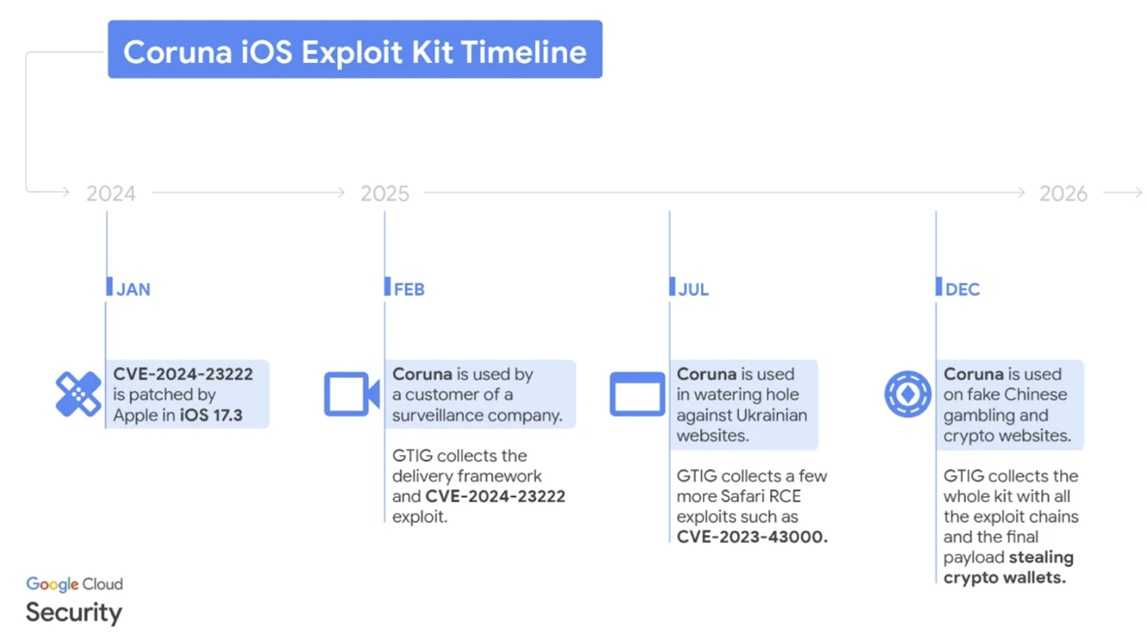
Researchers believe Coruna may have originally been developed as a government-grade surveillance tool before eventually appearing in the hands of cybercriminal groups. Since then, the exploit kit has surfaced in both espionage operations and financially motivated attacks.
Who could be affected
Devices running iOS versions 13 through 17.2.1 are believed to be vulnerable if they haven’t been updated with the latest security fixes. That could leave millions of older iPhones exposed.
A few simple habits can help reduce your risk:
 Update your iPhone immediately. Security updates patch the vulnerabilities Coruna relies on.
- Avoid suspicious links and websites, especially those sent through texts or emails. If you don’t know the sender, it seems suspicious in any way, or you’re not expecting a link or attachment, don’t click or respond.
- Download apps only from trusted sources. This means the official app store for your particular device(s).
- Enable automatic updates so your device installs security patches quickly. Then you don’t need to worry about that little red dot staring at you.
- Be cautious with cryptocurrency or gambling sites, which have been used in some attack campaigns. But not just those. Any questionable websites or those that don’t have “https” or the lock icon should not be trusted.
- If you are a journalist, public figure, or someone who may potentially be targeted for spyware, turn on Lockdown Mode for extra protection against advanced spyware. This is a “maximum security mode” available on iOS versions 16+. However, keep in mind some of the features of the phone will not work if this is turned on.
Even devices known for strong security can become targets when sophisticated tools fall into the wrong hands. Staying updated and cautious online can help keep your iPhone and your personal data out of a hacker’s reach.

 SUBSCRIBE TO WEEKLY NEWSLETTER