Online banking, shopping, and sharing family photos can make everyday life easier. Unfortunately, they also give scammers opportunities to steal information and money.
Criminals target people of every age. For older adults who want to enjoy the convenience of being online, a few practical habits can make a meaningful difference. You don’t have to become a computer expert to protect yourself.
2
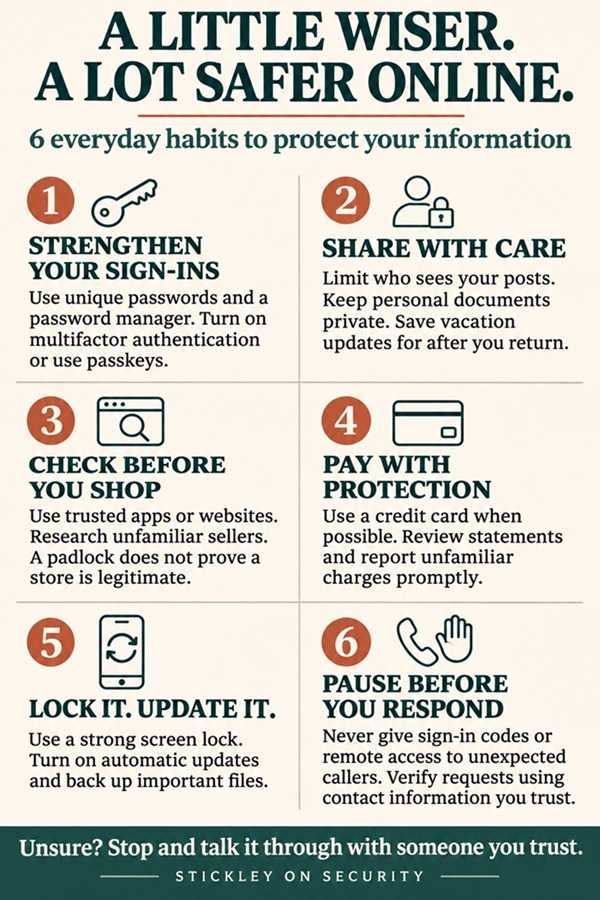
Use a different password for every account, especially email and financial accounts. Avoid names, birthdays, favorite teams, and predictable keyboard patterns.
A reputable password manager can create and securely store long, unique passwords. If you create your own, aim for at least 15 characters. A passphrase made from several unrelated words can be easier to remember.
Turn on multifactor authentication wherever available. Also consider passkeys, which let you sign in using your device’s security features and offer stronger protection against phishing than passwords alone.
Never share a one-time sign-in code or approve a login request you didn’t initiate.
2
Review who can see your social media posts, personal details, and friends list. Limit your audience to people you know, and remember that even privately shared photos can be copied.
Avoid posting pictures of identification documents, tickets, financial statements, or anything displaying sensitive information. Save vacation updates until you return home.
Whatever profile picture you choose, assume that a publicly visible photo can be saved and reused. Privacy depends on more than the angle of your head.
2
Visit retailers through their official apps, saved bookmarks, or website addresses you know. Be cautious of shopping links in unexpected messages and advertisements.
Check unfamiliar sellers before buying. Search for the company’s name along with words such as “complaint” or “scam,” and read reviews from multiple sources.
A padlock symbol or “https” means your connection is encrypted. It does not prove the seller is honest. Scammers can encrypt websites, too.
2
When possible, use a credit card for online purchases. Credit cards offer dispute protections when purchases go wrong. Keep receipts and order confirmations, review statements, and report suspicious charges promptly.
Digital wallets can also reduce exposure of your card details. For example, Apple Pay uses a device-specific payment number instead of sharing your actual card number with the merchant. That protection does not guarantee that a seller is legitimate.
2
Protect your phone, tablet, and computer with a strong passcode or password. Fingerprint or facial recognition can make unlocking easier while keeping protection in place.
Enable automatic screen locking and software updates. Back up important photos and files, and turn on your device’s lost-device location features.
If you want help from someone you trust, review settings together and make a recovery plan. Be deliberate about granting access to a device that may also unlock your email, banking, and other sensitive accounts.
2
An unexpected message about fraud, a delivery problem, or a locked account deserves a pause. Don’t follow its instructions simply because it sounds urgent.
Never give an unexpected caller remote access to your device or disclose passwords or verification codes. Contact the organization through its official app or a phone number you already trust.
And if something feels wrong, talk it through with someone you trust before acting. There’s no embarrassment in asking for a second opinion. A little caution can help you stay connected while keeping scammers out.