Many iPhone users feel confident about their phone’s security. But strong security protections don’t make a device phishing-proof. The same is true for Android phones.
Phishing attacks often focus on tricking the person using the device. A fraudulent email, text message, or message in an app may lead to a fake website that asks for passwords, payment information, or verification codes. Criminals don’t necessarily need to break into your phone’s operating system if they can persuade you to hand over the information they want.
2
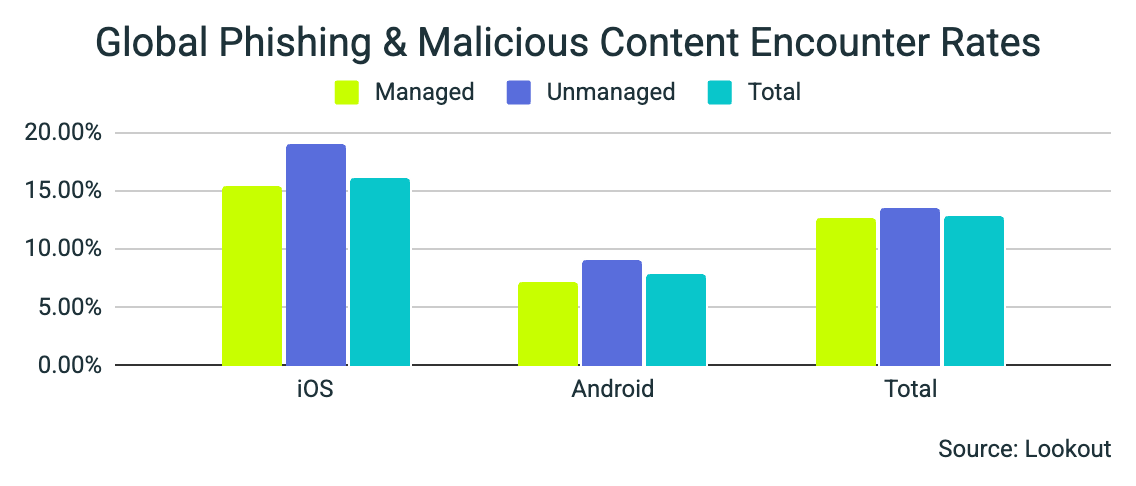
According to Lookout’s Q3 2025 Mobile Threat Landscape Report, 16.07% of enterprise iOS devices encountered phishing, compared with 7.78% of Android devices, a little more than twice the rate. These figures describe encounters in Lookout’s dataset, not the percentage of devices successfully compromised.
The pattern isn’t new. Lookout’s annual report found that 26% of iOS devices were targeted by phishing in 2024, compared with 12% of Android devices.

Lookout attributes the higher iOS exposure to attackers’ targeting strategies and enterprise usage patterns, including the assignment of iPhones to executives and other high-value employees. The findings do not establish that iOS is inherently less secure or that every phone owner faces the same level of risk.
2
Regardless of which phone you use, your habits are an important part of protecting yourself. Be cautious with links and attachments in unexpected messages, and don’t let alarming claims or pressure to act immediately rush your decision.
Check the sender’s actual email address rather than relying on the display name. Spelling mistakes and poor grammar can be warning signs, but a polished message can still be fraudulent.
If something raises even a moment of doubt, pause and verify. Open the company’s official app, visit a website you know is legitimate, or call a trusted number. Avoid using contact information supplied in the suspicious message. Once you identify a phishing message, report it and delete it.
Keep your phone and apps updated, and enable multifactor authentication on accounts that offer it. These protections add useful layers of security alongside careful handling of messages.
No matter which side of the Android or iPhone fence you’re on, phishing deserves your attention. Your phone’s brand doesn’t make a convincing scam harmless. Taking a moment to verify an unexpected request can help keep your information out of the wrong hands.
For banks and credit unions
Share this article with your members
Copy a ready-made summary and link for your newsletter, website or social posts.