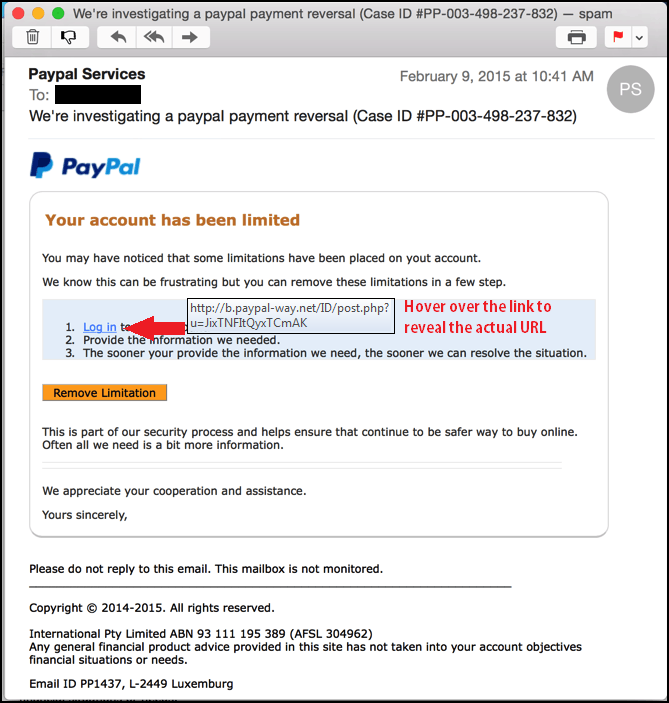
Phishers are at it again and this time they appear to be targeting Android users. Trend Micro reported that malware is being distributed in over 14,000 variations of the below email that tricks users into installing a fake PayPal app that takes over the user interface and steals login credentials. This current scam is being conducted in several countries, but Germany is getting hit the worst. It is clear that phishers don't discriminate between countries and will take anyone's credentials for financial apps. Therefore, it is important to know how to identify phishing spam.
This trojan arrives in an email which asks recipients to update their PayPal mobile apps. It also asks for administrator rights to the device, as well as other permissions. This holds true for anyone who uses financial apps or online programs.
Watch for typos, incorrect use of the language the email is written in and poor punctuation. In addition, look closely at logos and other images to make sure they are the same. Phishers are getting more sophisticated about copying images.
Hovering over any link with the mouse pointer will show the actual location the link will go to. So if the link claims to take you to Commerzbank (another targeted app with this trojan), but when the mouse hovers over it the address is a bunch of junk, delete the message without opening any attachments or clicking any links. In fact, don’t click it at all. Even if you feel confident about the link, manually type the URL into your browsers address bar.
Rules, regulations, and recommendations for online banking and financial services differ from country to country. So when in doubt, no matter where you live, contact the organization to verify legitimacy of the items in the email before taking any further action.
In addition, when updating or downloading apps, get them directly from the official app store for your devices, rather than take an email at the word of the author. Sideloading, or downloading them from sites other than these stores, adds additional risk such as this to obtaining the products.
The PayPal app does not ask for administrator rights to your device, nor should other legitimate banking apps. In fact, very few, if any apps should be asking for administrator rights to your device. Nor should they need you to change your screen lock password, which this one also may request.
For banks and credit unions
Share this article with your members
Copy a ready-made summary and link for your newsletter, website or social posts.