

Researchers have found yet another new variant of the Locky ransomware going around. In this case, it is the same old ransomware delivered in a different wrapper.
Locky has been around for a while in various forms. However, it is quickly morphing in order to avoid detection by anti-malware solutions. And while the focus is on Locky at the moment, it is certainly not the only one to be changing rapidly. It’s best to prepare for all of them, including Xbot, CryptoLocker, and Cerber to name a few more.
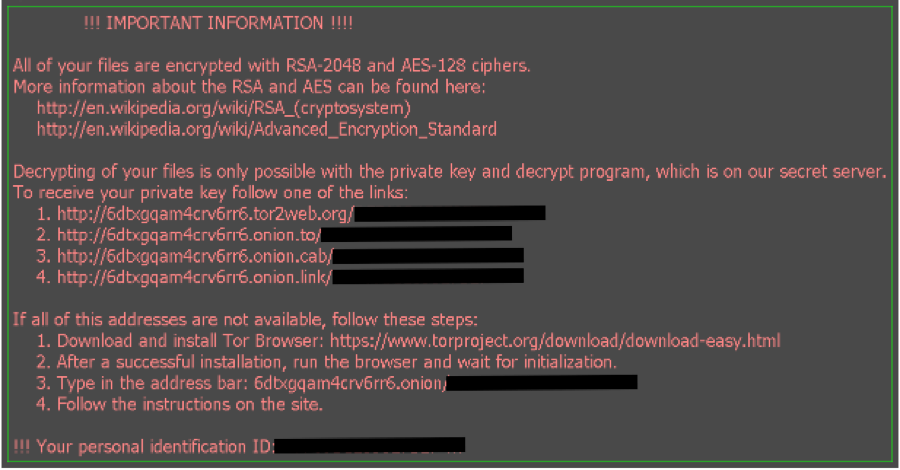
The result is the same, however, if ransomware manages to make its way onto your system. It will hold it for ransom for a sum of money. That amount ranges from a few dollars to hundreds. If you are ever infected with Locky, you will know it pretty quickly as the malware will reset your PC wallpaper with its ransom instructions:
However, don’t pay it. It really just makes the malware profitable for those launching it. Keep your money in your pocket and don’t put it in theirs.
In addition, why not follow the “NO More Ransom” initiative launched by the European organization Europol, the Dutch National Police, and supported by many IT security firms including Intel and Kaspersky? An effort to do this very thing began at the end of last year with Kaspersky and the Dutch, but Europol (the EU law enforcement agency that handles criminal intelligence) recently got involved as well; indicating the importance of thwarting ransomware and perhaps the prevalence of it.
The advice they provide is sound no matter where you connect to the Internet. It also reminds us that antivirus software should not be your only method of detecting it and preventing ransomware from making your day a very bad one.
 Back-up! Back-up! Back-up!
Create at least one backup of your data. This initiative recommends having at least two and making sure to store them somewhere such as the cloud or a separate portable drive. If you do use them to restore for any reason, make sure to disconnect as soon as you are done.
Use robust antivirus software.
Keep it up-to-date at all times and although it may slow down your system a little bit, it’s worth spending that little extra time to ensure something nasty doesn’t infect your system.
Keep all the software on your computer up to date.
When you get notifications that an update is ready for installation, take it seriously; particularly if it’s critical or security related.
Trust no one. Literally.
Any account can be compromised; even those of your friends and family. Even their social media accounts can be compromised. Use caution when clicking links or opening attachments and be wary if they are unexpected. Don’t open them at all if the sender is unknown to you.
Enable the ‘Show file extensions’ option in the Windows settings on your computer.
If you see a file with the extension “.exe,” “.vbs,” or “.scr,” they could very well be malware. However, those are not the only one used these days. In fact, “.doc” and .pdf” are used more frequently to distribute malicious files.
Finally, immediately disconnect identified rogue files or processes on your machine from the Internet
If you are struck with ransomware or your computer is acting particularly strangely, remove its access to the Internet (for example, shut off the WiFi functionality). This will keep the malware from spreading.
The “NO More Ransom” site, as well as Kaspersky includes tools to help you remove malware at no charge, should you have need. Hopefully, this is not the case.
For banks and credit unions
Share this article with your members
Copy a ready-made summary and link for your newsletter, website or social posts.




