

Pharming may be a new term to many folks, but it's actually an old one making a comeback. It’s obviously related to phishing, but it's not a proactive attack coming at people via email, texting or social media; pharming it is more of a passive attack. The two main pharming schemes are DNS cache poisoning and dojacking (domain jacking). Both seek to gain some type of valuable information that can be used for financial gain or identity theft by setting up a malicious or "fake" website and then just wait for people to arrive.
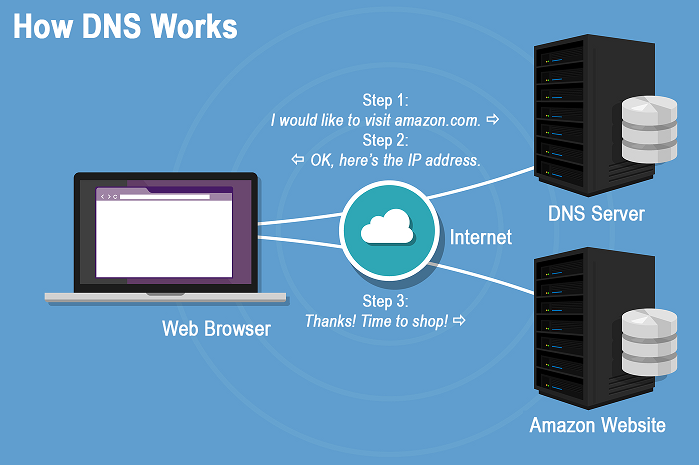
To understand DNS cache poisoning, you first need to know what a DNS is. It stands for Domain Name Service and it is how the domain you type into a browser address bar leads you to the correct website. It is basically a directory of all websites with their written and IP addresses. When we search for Amazon.com, our browser will ask the DNS service what the IP address is for amazon.com. The DNS service will translate amazon.com come into its IP address and send that information back to the browser so it can then visit amazon.com. The DNS cache is a list of addresses of frequently visited websites that is stored on a computer to speed up the time it takes for DNS to find the destination by allowing the page to load faster.
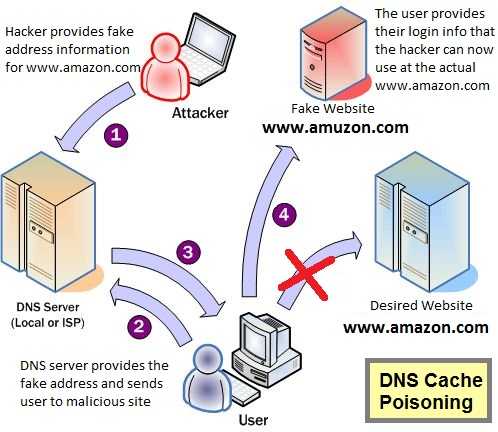 DNS cache poisoning is when the real IP addresses (the numeric addresses for a website) are changed in the cache list to direct the browser to a different website. There are DNS servers that have lists of IP addresses that are associated to the name typed in the address bar. When a site is visited, the DNS goes to the server, retrieves the IP address for the site and loads the corresponding site. If someone wants to redirect the user to another site, the IP address on the server can be changed. Then, it gets saved on that DNS cache list stored on the user’s machine, poisoning the DNS cache.
Dojacking is the other main way criminals attempt to Pharm our information. To pull this off, criminals will purchase domain names very similar to popular sites and hope that the visitor mistypes the domain in the browser address bar. For example, someone wants to go to amazon.com, but instead types amuson.com. Normally they would get a page error making them aware of the mistake. But if that URL was purchased for Pharming, they will land on fake website looking very similar to intended website and therefore, they can be tricked into entering details into forms, such as login credentials.
Information that is typically targeted in pharming include online banking login credentials, payment card information, social security numbers, answers to security questions, etc.; all of the information that can be sold on the black market for a good sum of money. This method can also be used to inject malware onto a computer, mobile device, or network, often without the user having any idea that it’s happening.
While it’s easy to confuse the two, phishing and pharming are technically different. Where phishing usually begins with an email message or text asking the user to click a link or visit a site, pharming can happen when a malicious site is visited, even if the user types the address manually.
 To mitigate pharming attacks, abide by some guidelines:
- Use anti-virus and anti-malware software on all devices and keep it up-to-date. These products usually monitor the files on the computer that store the DNS information. Therefore, if there is a change, the software will alert you.
- Make sure the URLs that you manually type into the address bar are correct before hitting the “go” button. While this is no guarantee DNS poisoning has not occurred, it will prevent do-jacking.
- Use bookmarks for frequently visited sites, such as to your financial institution that you know are safe.
- If entering sensitive information into any website, make sure the “https://” is shown on the browser and/or the lock icon or other secure indicator appears on the browser.
- Finally, make absolutely sure that the site in which you are entering sensitive data is the correct one. Look for any difference in the one with which you are familiar. If you can’t be sure, don’t enter the details. Clear your browser cache and try again.
Remember that regardless of what the tactic is called, the end goal is to get sensitive information from victims. Always be aware of where you enter that information to help protect your identity and your cash.
For banks and credit unions
Share this article with your members
Copy a ready-made summary and link for your newsletter, website or social posts.




