It’s always "fun" news when we find out that source code for a dangerous banking Trojan was leaked. In the case of this code, it even came packaged with instructions on how to use it. Already it has been found as the foundation for a very new version of credential-stealing Trojan being called Bankbot, reports researchers from Dr. Web. This one targets the Android operating system.
 Bankbot has many capabilities. Once it gains administrator privileges, it can:
- Intercept SMS/text messages
- Make phone calls
- Steal information from the list of contacts in the device
- Steal sensitive information
- Track devices
Other malware that is similar to this include SlemBunk, Bankosy, and MazarBot, which all were built off the GMBot foundation source code that was leaked early last year.
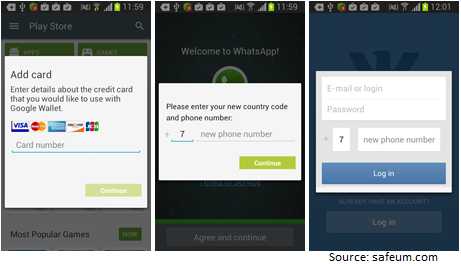
Bankbot makes its way on to the devices via popular applications. However, once the infected app is installed, it removes the app from the device’s home screen to make it appear as if it has been delete. However, it hangs around in the background waiting for the user to open an app from which it desires to steal information such as online banking apps, payment system software, or social media account information. Then it will launch a fake front end to phish for the details for those accounts. It can phish for this using Facebook, Instagram, imo, Google Play Store, Snapchat, Twitter, Uber, Viber, WhatsApp, WeChat, and YouTube. It’s likely others can be and will be used as well, so don’t let your guard down.
There are some ways to mitigate the risk of acquiring this Trojan:
- Avoid downloading apps from locations other than the official store for your device. This process is otherwise known as sideloading.
- If you are not expecting to receive a link or attachment from anyone, known or not, don’t click it. This includes whether it comes from email, text/SMS message, in a chat app, or in any other way.
- Install anti-virus and anti-malware on your devices and keep it updated at all times.
- Do all transactions that involve sensitive information on secured Wi-Fi or by using your device’s cellular data functions. Don’t use public or unsecured Wi-Fi for these tasks, as the data being passed can be easily intercepted.
Finally, no matter how nicely and app asks, don’t give them administrator permissions. There really is no need to grant these for most users but if they are given to someone with nefarious intentions, they will give that person a lot of power to make your life a bit more stressful.
For banks and credit unions
Share this article with your members
Copy a ready-made summary and link for your newsletter, website or social posts.