Today’s lesson is simple. There is no Adobe Flash Player app for Android. Therefore, if you ever see something saying you need to download or update Adobe Flash Player on your Android device, there is a very good chance someone is trying to get malware onto your it.
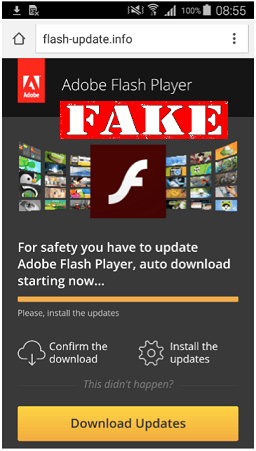 Adobe stopped developing Flash Player for Android five years ago. Yet, some people are still falling for tricks that use it as a lure. Unfortunately, this is one of the easiest ways that cybercriminals get malware installed. It ranks right up there with so-called dedicated video players or add-ons that are supposedly needed for adult movie viewing.
What is perhaps most surprising about the recent cases found by ESET, is that it’s apparently obvious users aren’t paying attention to what is being installed on their smartphones and tablets. This one claims to install Adobe Flash Player, yet during the process it suddenly switches to a “battery-saving” app. Users just seem to be ignoring that this is happening and keep clicking through the installation screens.
So it bears repeating. There is no supported legitimate Adobe Flash Player for Android. So if it's asking you to install it, it’s most likely malware.
Also, this fake app is only an option to those who sideload apps. That means they get them from places other than the official app store. This is going around the built-in safety features of the device, so it’s not recommended to sideload any app.
While getting products from the app store does not guarantee a malware-free app, the risk is still lower. However, at the very least pay attention to what the installation screens are doing. If the app suddenly changes, it is likely not something you want on your device. In addition, if it asks for administrator rights, it’s probably also up to no good. So, in those cases, don’t grant them.
For banks and credit unions
Share this article with your members
Copy a ready-made summary and link for your newsletter, website or social posts.