


Locky is on the loose again, in its sixth iteration. In this one, it uses the Necurs botnet again to spam email inboxes with a cleverly disguised Word Document embedded inside a PDF file.
Locky has been out of the limelight for a few months after making a big bang in 2016. Last year, it evolved into five versions, each changing enough to evade detection. All rely to some degree on the user being convinced to click on an attachment that sets ransomware free and encrypts the files on the device.
What to look out for is still basically the same. This latest version has been seen by researchers at Talos and Malwarebytes and still uses some social engineering to get a user to click a PDF, that has an embedded Word document. The goal is to get the user to enable macros for the Word document so the ransomware can run. The email is a fake invoice or a scanned document.
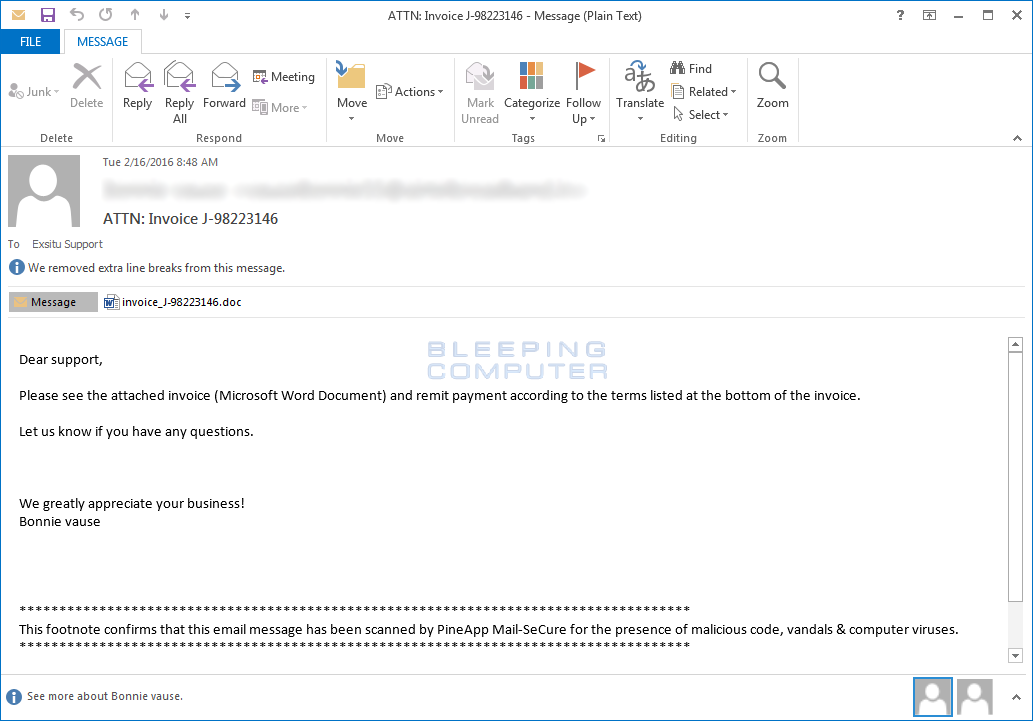
This is another reminder to be very careful about opening document that appear in email messages that are unexpected. The same goes for links. Even if it seems the email was from someone you know or with whom you do business, it does not guarantee any attachments inside it are not going to do some damage to your machine or company network. Whenever there is even a tiny bit of doubt, confirm the legitimacy with the sender by sending a separate email message (as opposed to replying to it), by sending a text, placing a phone call, or by visiting the person’s desk if possible.
 In this latest version, the files on the infected device are encrypted with the .osiris extension and will cost the user .5 Bitcoin or roughly $623 to decrypt them. It is never advised to pay a ransom. Instead, keep current backups of important files that can be easily restored if needed.
Locky was first seen in February of 2016. At that time, it was targeting healthcare, government, telecom, and universities in addition to individual users. It continues to do so.
Version one borrowed some distribution tactics from the Dridex banking trojan. It used fake invoices as bait. These were is MS Word format and included macros. If the macros were enabled, it would unleash the ransomware and infect not only local files, but also those on network drives and external drives if any were found.
The second iteration of Locky used different extensions on the encrypted files and was seen in early August. It used JavaScript (JS) or Windows Script File (WSF) in a zipped file. Attachments were disguised as invoices, bank account reports, job offers, or delivery reports.
A third spinoff changed extensions again to .odin. The installer was an encrypted DLL for this version, but the rest was largely the same.
For number four in late October, the names of the ransom notes changed as well as the extensions. Each of these seemingly small changes are intended to allow the malware to evade detection by security tools.
 Less than 24 hours after version four, came version five. No one really understands why so quickly, but again the extensions of the encrypted files changed. In all cases, the attachments were some form of fake invoice, paystub, receipt, order information, or wrong payment form notice.
These show how the cybercriminals are trying hard to continue to bypass technological security tools and take advantage of social engineering tactics. Researchers are also now finding Locky changing so that it can work offline rather than make connections back to a command and control center. Often, those connections are what give ransomware away.
Each iteration of Locky gets more creative and regardless of the software tools that are implemented on a network or device, it will always be part responsibility of the end user to know how to identify phishing in order to thwart it.
For banks and credit unions
Share this article with your members
Copy a ready-made summary and link for your newsletter, website or social posts.




