Back in May, Google users were targeted with a scam using Google Docs. Users received messages, in some cases appearing to be from known senders, asking for collaboration on Google Docs. What actually happened if they fell for it was they gave away all the information in their Gmail accounts. Google responded by releasing an anti-phishing tool for Android users within a day! Now, they’ve released one for iPhone too that should be rolled out completely by the end of August.
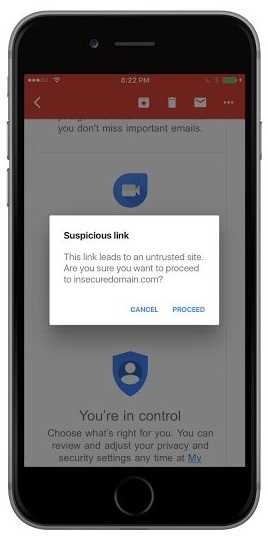 Google used its machine learning capabilities to create the new tool that can recognize suspicious email messages. And the fact that, according to HumanFirewall.io 60% of email these days is opened on mobile devices makes this tool very relevant. It's important to note, that this tool only works when using the apps and not if using the email client of the device; at least for now.
Google claims that 50-70% of email in its Gmail product is spam and its detection mechanisms catches 99.9% of it. However, some still gets through with malicious links and that is what this new tool is designed to catch.
Should a suspicious link arrive in a message, there is a dialogue stating that “The site you are trying to visit has been identified as a forgery, intended to trick you into disclosing financial, personal or other sensitive information” with additional warnings confirming the user wants to proceed. Then, it’s up the users’ phishing detection mechanisms to make the final call.
While the tool looks for lists of known suspects, some are likely to get through. It’s still important to use your knowledge of phishing attempts to catch the .10% that Google doesn’t. They would be to:
 Ask yourself if a link is expected. If not, verify it from the sender first.
- Confirm that the sender is someone known. Even if it is, but a link is not expected, it should be eyed with suspicion. Pick up the phone, walk to the sender’s desk, or send a separate email (don’t reply) to confirm.
- Don’t assume that if you know the sender, a link is safe. Follow the “is this expected” rule regardless.
- Hover the mouse pointer over the link to be sure it’s headed where you think it should be. If not, it very well could be phishing. If on a mobile device, hold your finger on the link for several seconds (rather than just tapping it) to see where it’s going.
- Use common sense. While the Google tool does not have this capability, you do. If you didn’t place an order at the Apple Store but you got an email that you did, odds are someone is phishing for your Apple login credentials. If you ever are unsure about such an email message, log into your account, whether it’s your financial institution or an online retailer, separately and find out if there are any rogue charges.
Forbes has stated that 85% of companies were hit with phishing attacks in 2016 and 70% of phishing email contained some type of malware. Dealing with successful phishing isn’t cheap either. Per Forbes, each one costs $1.6 million to remedy.
For banks and credit unions
Share this article with your members
Copy a ready-made summary and link for your newsletter, website or social posts.