Earlier this year, South Korea discovered yet another flaw in Adobe Flash player. While finding a vulnerability, and even a zero-day vulnerability, is not news for this product, this particular one was actively being exploited, according to South Korea’s Internet & Security Agency. And the exploiters were not their friends. In fact, it was North Korea-linked APT37 group that used it to deliver malware.
 Well, the good news is that Adobe did patch that flaw. It also patched another critical issue along with it, but now researchers at Morphisec have uncovered a campaign that exploits the same flaw that APT37 used. This time, it appears the hackers are a different group.
Right away your Spidey sense should be telling you something like “I better go patch all of my systems.” That’s good advice. Listen to your Spidey sense. Keeping all products updated with the latest patches is critical for avoiding getting caught in a cybersecurity web. If a security or critical patch is released, especially for Adobe Flash, don’t wait for a regular patch cycle to apply it. Just get to it right away. For home users, consider enabling automatic updates for all your products. That will help you keep on top of them and may prevent a large gaping hole from being open longer than necessary.
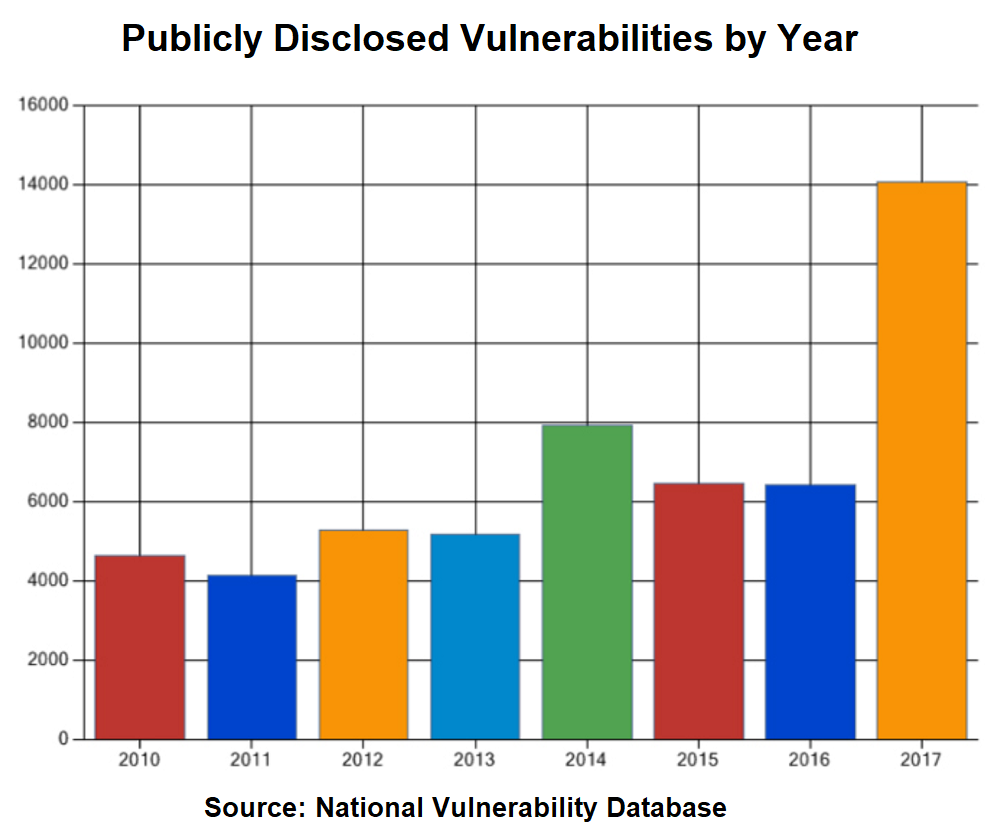
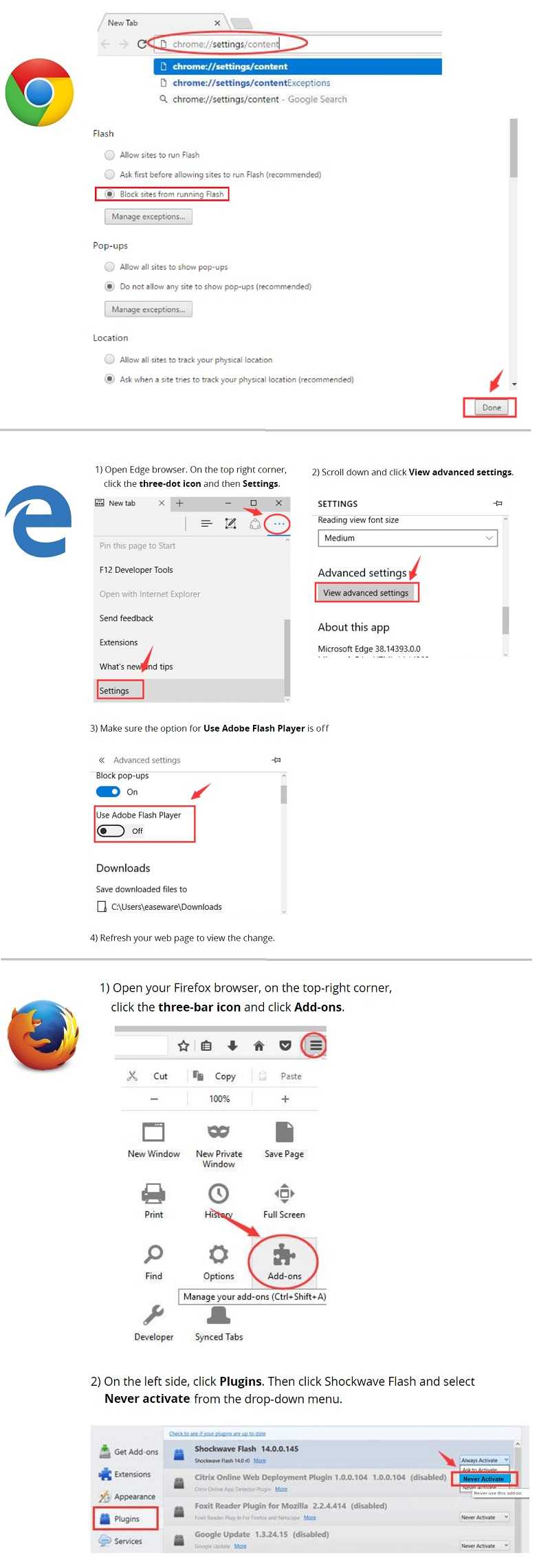 If you don’t need Adobe Flash (and most of us don’t anymore), just remove that plug-in from all your browsers. Very few websites are using it now, because there seems to be a new vulnerability about every other month. And they are not minor. They are usually cavernous. So check your browser settings and if you’re not sure if you need it, disable it first. If you find that everything is working just fine without it, you don’t need it at all and can delete it.
Also, be wary of clicking to install any new plugin that may be “recommended” while you’re browsing. Hackers are now putting malicious code into plugins and popping up dialogues letting users think they need them. Just close out those windows. If a site just does not work without a plug in, reconsider if you need to use that site.
 The campaign that is going around now is exploiting CVE-2018-4878. Spam is being sent out that includes a link to a stored document on a “safe-storage” location. If it’s downloaded and opened, social engineering trickery is attempted and claims that the preview they are trying to see isn’t working properly. Then, to see the real documents, they need to enable editing. After that, a Windows command prompt appears. If you don’t know what do at the command prompt and yet you see it, you may want to run a scan of your computer and/or get some technical support assistance. There is a reasonable chance your device was infected.
For banks and credit unions
Share this article with your members
Copy a ready-made summary and link for your newsletter, website or social posts.