


If you haven’t yet changed your default password on your internet router, stop right now and take a few minutes to do it. Not only is the FBI recommending this because of the recent discovery of the VPNFilter malware, but now there is more malware that can hijack that same router (and any others) and spy on users. Roaming Mantis, changes the router’s DNS settings to direct traffic to fake versions of legitimate sites. In this case, it uses Android devices with malicious apps installed to steal login credentials to financial accounts.
This warning goes for home and business users that have devices that connect to the Internet. Those are the ones at risk for DNS hijacking. DNS, domain name system also referred to as domain name service, translates a website address to an IP number. It can be thought of as your computer’s phone book. That’s why it’s serious if these DNS settings are modified. If a lot of users get sent to fake websites and enter in their credentials, it’s quite a successful day for the cybercriminal.
Once a person’s DNS is overwritten, this group redirects users to malicious websites that pop-up a message promoting a Chrome upgrade for a better browsing experience. The malware will pop up a warning message asking you to update your Chrome version on the mobile device.
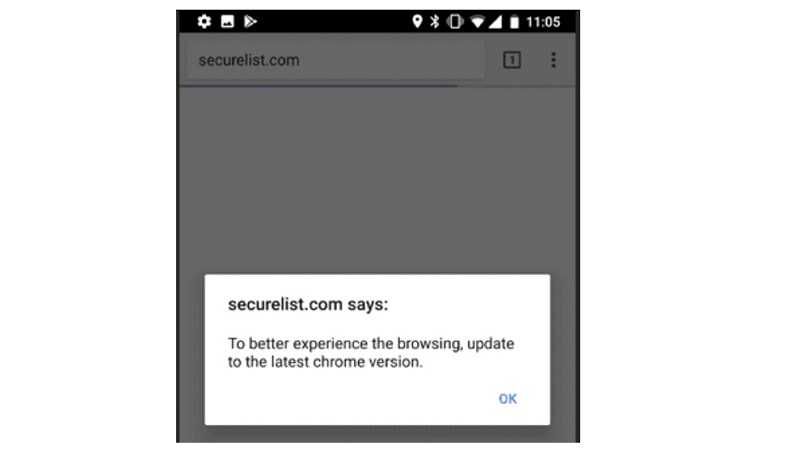
If you click OK, it will download and install a fake version of Google Chrome, then ask for various permissions including access to the device’s account details, the management of texts and phone calls, and recording and video capabilities, as well as others. If the user goes so far as to give the app appropriate permissions, another dialogue box appears stating “Account No.exists risks, use after certification.” That alone should be a big warning that something is amiss. If “Enter” is clicked, it’ asks for the name and birthdate associated to Gmail.
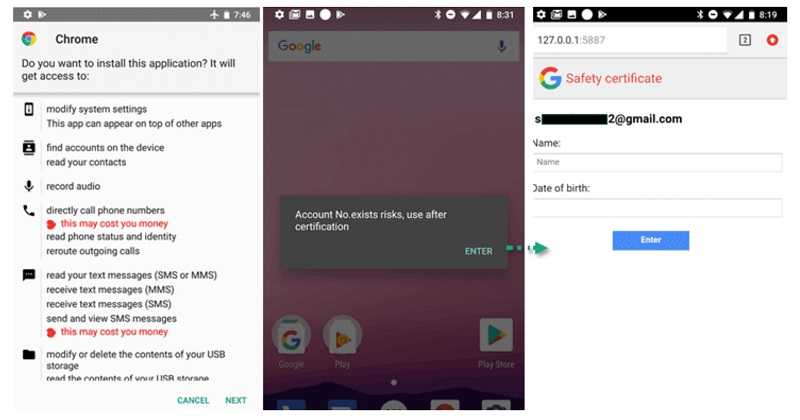
With access to the texts/SMS, it can intercept multi-factor authentication codes too. Never give apps access they don’t need. Very rarely, if ever, does an app need access to your device’s account settings or administrator password. If it asks, definitely do more research. It’s likely the app is up to no good. This one tries to trick users into entering Gmail credentials. If it gets enough information out of the user, it can potentially get access to all kinds of accounts such as social media, email, and financial accounts.
 While you’re making sure your password is strong, make sure your devices are updated with the latest security patches. Hopefully, you have already done this after the FBI’s warning about VPNFilter.
Also, be sure to only download apps for all of your devices from the official stores, such as Google Play or the Apple Store. While there is never a 100% guarantee that these are free of malware, they are less likely to have it. The apps typically go through more security scrutiny before they are allowed into those stores than those that can be found on third-party sites. In this case, it is a third-party site that hosts this malicious app. Kaspersky Lab found references to South Korean mobile banking and gaming apps, as well as to a Chinese social media site, Sohu. Roaming Mantis was detected at least 6,000 times by Kaspersky. This indicates that it’s capable of spreading very quickly.
For banks and credit unions
Share this article with your members
Copy a ready-made summary and link for your newsletter, website or social posts.




