

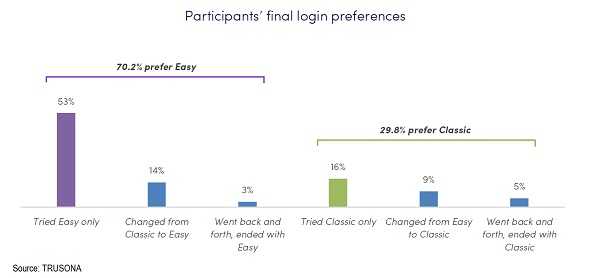
It’s likely no surprise to you that consumers are getting a bit exhausted with all the passwords for all of their online accounts. Recently, Google announced it would be implementing a change to the Chrome web browser that would allow users to do away with the classic password in order to access their accounts. And that is a great idea because a research firm, Blink, along with Trusona did a survey and discovered that 70% of consumers opted for some “alternative” form of authentication over the password.
The study was structured so that the participants didn’t know the purpose of the study. But they logged into a site at least three times per week with the option of using an “easy” password-free option or the classic login with password combination. Eighty four percent of them chose to use the “easy” way at least one time per week and only 47% chose the classic once a week. Perhaps that’s because of unsuccessful logins? The rate in this study when passwords were used was only 56%. That can be frustrating, for sure!
However, until such time that browsers are using biometrics and other ways to authenticate to your accounts, you are still going to be required to come up with strong passwords and use them.
- Be sure to use a unique password or phrase for every single online site.
- Each password should be at least eight characters and use upper and lowercase letters.
- At least one special character and one number should be in each password.
- They should never be easy to guess or be discovered using brute force password cracking methodologies.
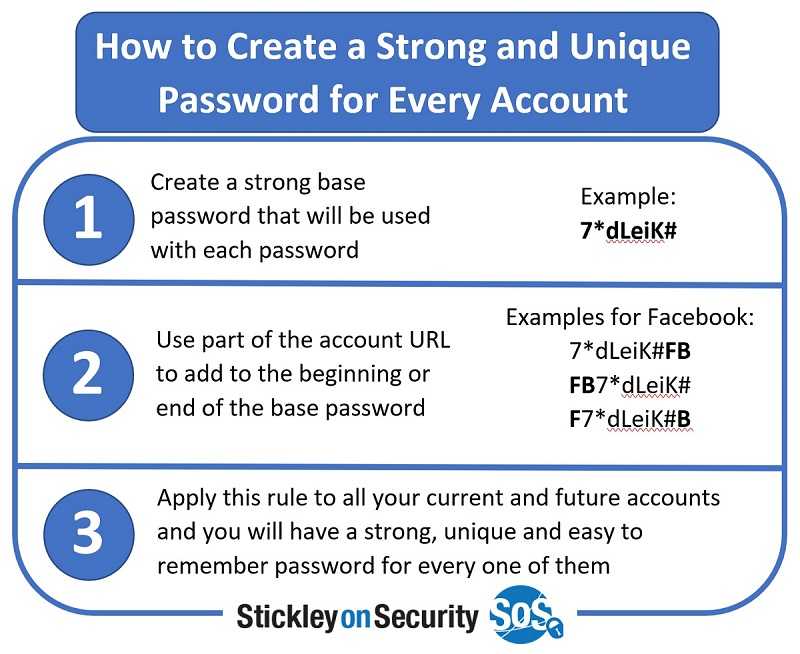
Yes, there are so many passwords to remember. If you need to write them down on a piece of paper, do it. Just store it safely away from your computer. Don’t make an electronic document you leave on your computer. If you just don’t want to do that, consider a password manager. However, keep in mind that if one of those suffers a data breach (both LastPass and OneLogin have), the criminals will have all of your passwords rather than just one of them. You decide what’s best for you.
For banks and credit unions
Share this article with your members
Copy a ready-made summary and link for your newsletter, website or social posts.




