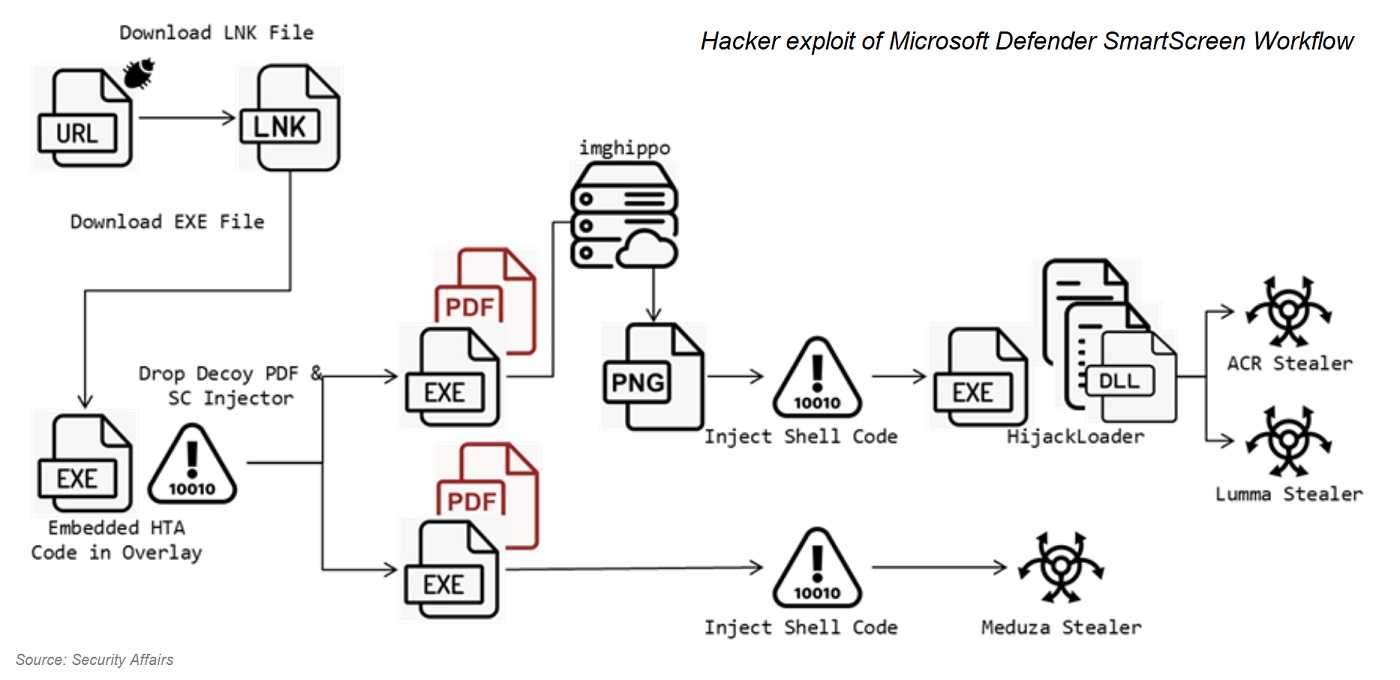
When an organization alerts its users a patch for a security flaw is available, the smartest response is a speedy installation. Months ago, Microsoft did just that. The tech titan released a security patch for its Defender users, yet evidence shows the flaw is still being abused. That means some Defender users still haven’t applied the patch, putting them at real risk of personal data theft.
2
Currently stealing information from users in the U.S., Spain, and Thailand, this Defender vulnerability is rated as “high severity” and tracked as CVE-2024-21412. In particular, the flaw abuses MS Defender’s Smart Screen. Hackers access an unpatched device by luring victims via a specially crafted, malicious URL link. Once clicked, info-stealer malware gets installed and goes to work.
This info-stealer sends a treasure trove of hijacked, sensitive information into the hacker’s hands. It steals PII stored in password managers, emails, crypto wallets, web browsers, VPNs, and messaging apps for starters. The stealer targets commonly used apps like Microsoft Edge, Mozilla Firefox, Opera, and some versions of Google Chrome. Vulnerable messenger apps include WhatsApp, Telegram, Signal, and Pidgin.
2
 User’s lagging behind applying Defender’s security patch could find a cache of their PII hijacked. From there, it’s not a leap to assume that PII ends up posted on the dark web for sale, or even for free. Data is hacker currency, and some even post pilfered PII as a way of boasting about their hacking skills. There’s no telling when and where a user’s captured PII gets used for future attacks.
Not taking the few minutes to apply a security patch can have disastrous results. And MS's Defender patch is a classic example of just how much is at stake. In a world where data breaches happen daily, not applying a security patch opens the door for a hacker to do serious damage. With Defender, just one wrong click unleashed an info-stealing campaign on unpatched devices. Take a moment to head over to Microsoft’s website and find out how to get Defender patched. That’s the safest way to do it. Also, ensure you have automatic updates enabled. Then, you don’t have to remember to do it when the patches are ready for you.
For banks and credit unions
Share this article with your members
Copy a ready-made summary and link for your newsletter, website or social posts.