


Alibaba is China’s largest online marketplace for consumers and businesses. According to the Wall Street Journal, it is also a bank and a search engine. It hosts hundreds of millions of businesses all over the world, possibly making it the world’s largest e-commerce company. It is also being used for a new phishing campaign.
Messages are begin sent out to Alibaba users with fake sender addresses. They seem to be from a legitimate Alibaba address for providing feedback, but that address is actually spoofed, or faked.
The email asks user to enter their Alibaba credentials into a form to “verify” them. Once they have done so, a message appears stating “Verification Completed, Your email will not be included in any spam or fraudulent list. You are now safe to access your email. Thanks for using our email verification system.”
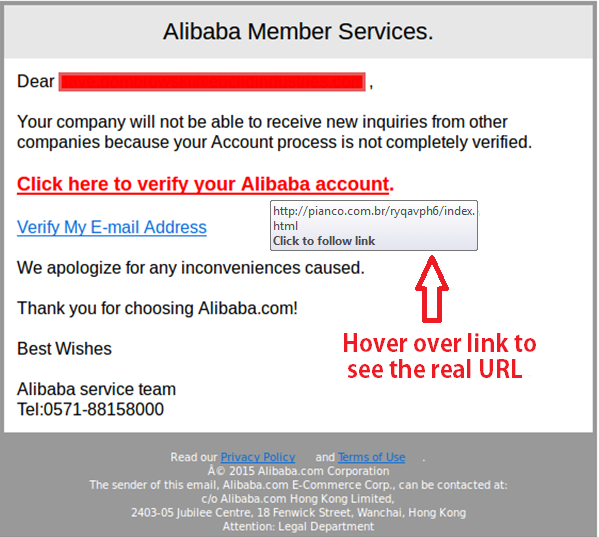
If you received the above message, you may have been a victim of this. And if so, the scam will have provided your email address and login credentials to the scammers. This means they have all of the information you have provided to Alibaba. Therefore, change your password for the site immediately, doing so directly from that site and not by clicking a link.
Make sure when changing passwords for any site, they are unique to each site. They should also be strong. This means to include upper and lower case letters, a number or more, and a special character or more. Mix up the order of the special characters and numbers. Studies have shown that most special characters are placed at the end of the passwords, so be a rebel and put them somewhere else. Make it more difficult to crack your passwords.
In addition, avoid using personally identifying information such as your pets’ names, your child’s name, birthdates, or other information that can be put together and associated back to you. Never use your social security number in a password.
Ok, we know it is incredibly difficult to keep changing passwords and making them strong, but also memorable, so here are a few tips:
 Creating strong passwords and phrases
Use the “dice method” for choosing passwords. Choose a couple of words that normally wouldn’t be used together to create a difficult to guess word. This could be something like “2%fireplacegymshoes.” Then keep that foundation passphrase, but bookend it with the first two characters of each website for which you have online credentials.
For example, if the website begins with “ta,” your password would become “t2%fireplacegymshoesa.” If another site starts with “mo,” your password for that site would be “m2%fireplacegymshoeso.”
You could also choose a foundation passphrase of at least six characters of your own. Then integrate characters from the websites into that.
2
It does get more difficult to remember all the passwords you need in a day. So if you have to write them down, try to use clues to jog your memory rather than writing out the whole password.
If you do write them down, even using clues, don’t leave them in plain sight and store them somewhere away from all devices you use to access the accounts. Should a hacker get into your device, they would have your password list too. Lock up your list when you don’t need it, especially if you leave it at the office. If you do, don’t leave it on your desk. Social engineers are notorious for quickly swiping documents off unattended desks and printers.
Use a baseline password you will not forget and use one of the methods above to make it unique. Then you will always remember it. Make sure your baseline password is at least six characters and that you add at least two more. Final passwords should always be at least eight characters.
Change passwords often; at least quarterly. This keeps the criminals on their toes and possibly will prevent them from ever succeeding at getting into your accounts.
2
Other sites are susceptible to being used by phishers to try to scam people. Often it is popular retailers like WalMart, which are ramped up by scammers during the holiday shopping season. However, shipping sites such as FedEx and DHL have also been used in the past.
Just make sure you remember not to blindly enter information in just any form that pops up. Take a close look to make sure it’s legitimate first. If you aren’t sure, either close the window without entering information and verify by going directly to the organization’s website. Don’t let popup fatigue or persistent criminals get the best of you.
For banks and credit unions
Share this article with your members
Copy a ready-made summary and link for your newsletter, website or social posts.




