


Web browsing is one of the top ways that computers become infected with malware today. With that in mind it is easy to understand why organizations continue focus their attention on web browsing security.
 One of the biggest mistakes that employees make when it comes to web browsing is the assumption that the organization has implemented filters intended to protect them from browsing to potentially malicious websites. While it is true that many organizations will incorporate rules that block employees from browsing to certain types of websites, when it comes to blocking all malicious websites that is rarely possible. This is why it is even more important that everyone understands the risks and tries to avoid putting their computers and the corporate network at risk.
There are numerous ways in which criminals will attempt to install malware on your computer via web browsing. These can range from the more obvious attacks in which a website will attempt to send you software to download and install, to the almost undetectable zero-day vulnerability exploits. There are also other attacks that can take place through web based applications such as Java and Active X. All are discussed below.
 If you are browsing to a website and it requires you to install any software in order to continue, you should immediately stop and ask someone in your IT department for help. It is rare that your computer will require new code to be installed by a third party website in order to work properly. In most cases this software will either be malicious or include some level of marketing spyware that will slow your computer or potentially make it unstable. Again, just remember that if any website attempts to send you a file talk with IT before continuing and confirm your next step.
The biggest risk you face, is when it comes to what are known as zero-day vulnerabilities. A zero-day vulnerability means that there is a risk on your computer with no patch available to fix it. An example is when a new vulnerability is discovered in Adobe Flash. Often it can be several days or longer that your Flash Player is at risk and no patch is available to fix it. The problem is that if you browse to a website that has malicious code on it, simply connecting to the page is all it takes for the vulnerability to be exploited on your computer. In these situations, you will not see a warning or receive any indication that something is happening. In fact, in most cases it will appear as if you have just browsed to a webpage and everything is fine. Unfortunately because there is no patch available, there is often very little your IT department can do to protect you. That is why it is so extremely important that you are cautious in choosing where you browse on the Internet. It is also the reason it is so important that you never tamper with your anti-virus, personal firewall, or other security software on your computer and always allow all security updates and patches to be applied when they become available.
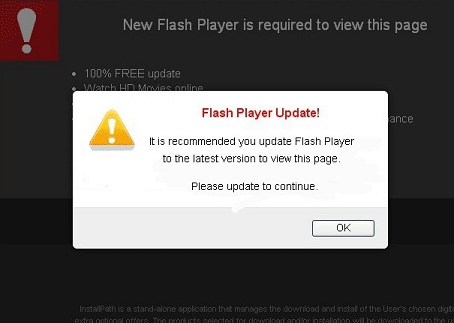 In some cases a webpage may prompt you to install a Java or Active X application. Again it is extremely rare that these types of applications are used for purposes other than malicious attacks. In these instances, you will be prompted to choose “Yes / No” to install it or “Install / Cancel.” Criminals are creative though and they will make it so that if you choose no or cancel, the page will just prompt you again. In some cases, you will not be able to browse to any other page or even close the webpage you are on at the time. The hope by the criminal is that you will simply choose to install the application so that you can move on. It is important that you never click to install. Instead pick up the phone and contact your IT department and explain to them what is happening. They will be able to help you get out of the webpage and back to safe browsing.
Of course other risks exists when browsing on the Internet outside of malware being installed on your computer.
The unfortunate reality is that browsing on the Internet will always be a risk to your computer and your organization’s network. Limiting where you browse and remaining diligent about potential security risks can at least help reduce your chances of falling victim to malicious website attacks. If you ever feel you may have visited a malicious website or your computer seems to be acting strangely or different from normal, never hesitate to contact your IT department and make them aware of your concerns.
For banks and credit unions
Share this article with your members
Copy a ready-made summary and link for your newsletter, website or social posts.




