

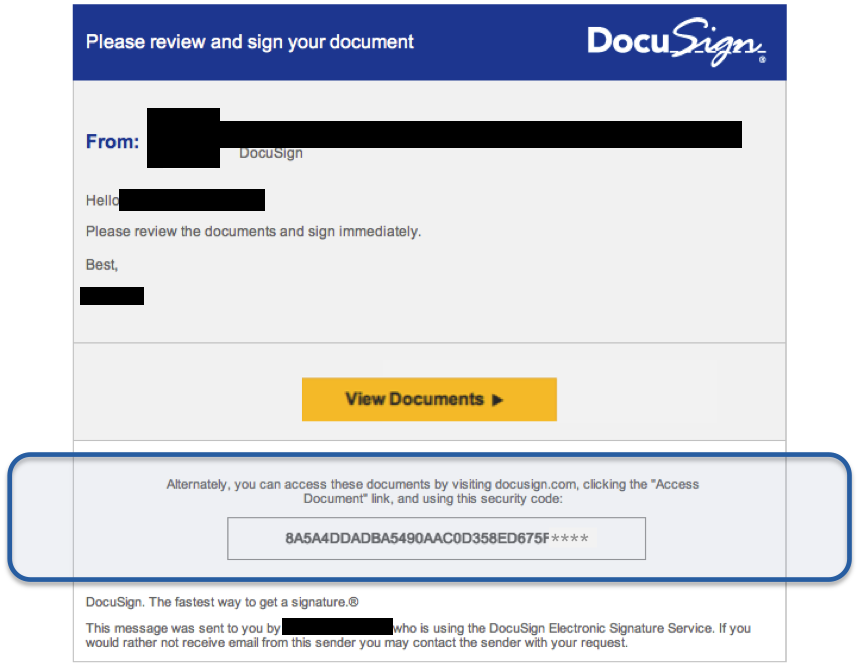
Yet another scam is making the rounds and it’s phishing for your sign in, password details and other personal information. This one uses the electronic signature verification service DocuSign to trick users into getting hooked.
It comes in email and although it might look very legitimate, it isn’t. Phony links phishing for details or that will install malware can even trick those who have been educated. People get busy and forget to pay attention. That’s why continuous education is important.
Watch out for the signs of phishing in every message you receive. It doesn’t take long and can prevent a lot of headache. Sometimes phishing comes in text messages and can even come in the form of a phone call (referred to as vishing). Whenever someone asks for sensitive information, ask a lot of questions and make sure you feel 100% certain it’s safe to give it out.
However, unless you initiate the conversation, you should not provide any of the information. Do a check separately to ensure the person asking for it really needs it. Either place a separate phone call using a number you found outside of any email, text message, or phone call from the requestor, or use a separate email message rather than a reply.
 Look closely at the message to identify the little nuances that may give it away as phishing:
- Incorrect use of the language in which it’s written and typos
- Outdated logos and fonts and/or poor graphics quality
- Any attempt to scare you, such as a threat that your account will be shut down unless you click the link
- A link that seems to go somewhere you don’t expect. You can check it by hovering over it with the mouse pointer. In the case of mobile devices and touch screens, use caution and you can hold your finger on the link for a few seconds and the address will appear without going to the site.
Always keep anti-malware software updated on your computers and devices and apply patches and updates as soon as they are released. Although these won’t prevent you from taking the action and clicking a link, it may catch malware before it can execute its payload.
When might someone use DocuSign? Any time a signature is needed, this can be used instead of an inked one. Often it is used for getting loans, making financial transactions, and for signing legal documents.
For banks and credit unions
Share this article with your members
Copy a ready-made summary and link for your newsletter, website or social posts.




