

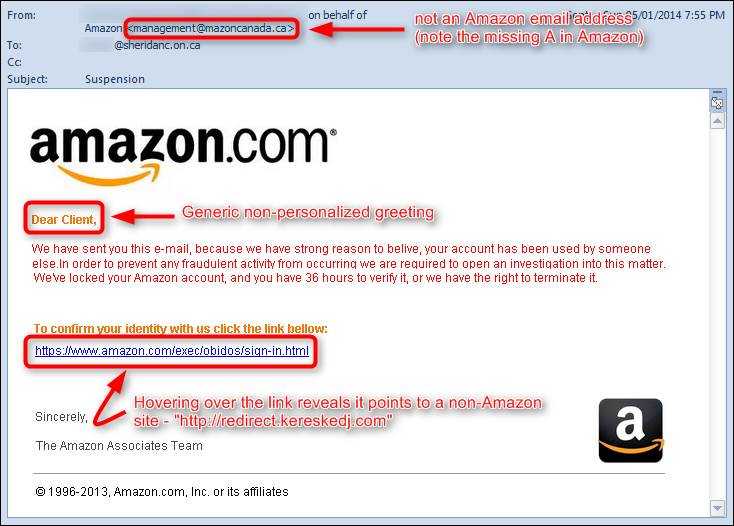
Amazon shoppers are being scammed again. According to the email, in order to confirm the account, a link must be clicked. It goes to a page asking for entry of name, address, and of course, payment card information. That is the real prize for this scam. Unfortunately, the web page looks very similar to what would be found on Amazon’s actual site, so it is difficult to immediately determine that it’s fake.
Again, phishing is the method of choice for acquiring the information. If you receive any email messages that you are not expecting and they contain links or attachments, confirm they are legitimate before taking any action. The best way to confirm details for any online account is to log into your account directly from the site. There is no reason you need to click links in order to do this, regardless of who sends the email, even if it really is Amazon or your financial institution.
You can usually see where any link takes you by hovering over it with your mouse for a few seconds. If you are using a tablet, holding down on it for a few seconds will show you where it’s headed. If it does not look like it is taking you where you think it should (for example to your financial institution’s site), it could be phishing.
 Amazon has stated that it will never ask for sensitive or payment details in an email message. If you are ever in doubt, take a few extra minutes to contact the sender separately to confirm it. There is no reason to fall for scare tactics like this. Confirming may be done by creating an entirely new email message and manually typing in the address of the sender, by calling the sender on the phone, or by sending a text. Most online sites also have help lines and contact details on their sites for verifying such messages.
For banks and credit unions
Share this article with your members
Copy a ready-made summary and link for your newsletter, website or social posts.




