


Gmail users are targets of another scam. This one is rather creative and appears to use some pretty sophisticated automation or there is a whole slew of people sitting and waiting to get to work once an account is compromised. This is because as soon as a person falls victim to the scam, the attackers use that information to login to the victim's real Gmail account and start snooping around.
The scam is so effective because it uses the previously hacked Gmail accounts to attract more victims. It all starts with a phishing email with a malicious attachment. If that attachment is opened, a new browser tab is opened and the person is presented with a fake Gmail login page. The below domain is clearly not a Google URL.
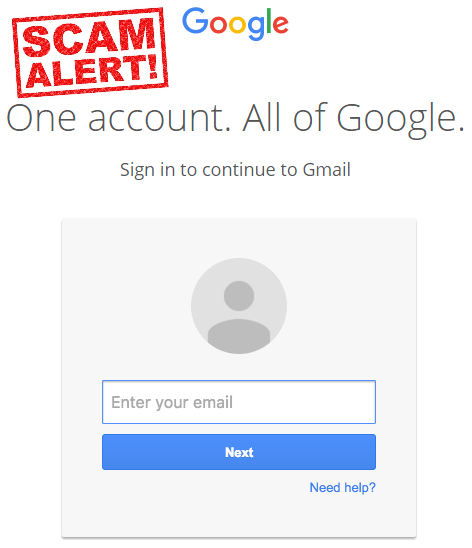
Thinking nothing of this, many people will enter their credentials and "log back in". What really happens is the criminal captures that information and uses it to login to the victim's account.
The criminals are looking for previously sent messages with attachments. They then use those to send messages to the victims’ contacts. This makes it appear that the recipients are receiving emails from someone they know and may even be familiar with the subject of the email, which makes it more likely the attachment will be clicked. A recent study by Avecto found that 68% of survey participants would click links from someone they know without question. That makes a scam like this one quite likely to be successful.
 To avoid being scammed by this and inadvertently spamming your friends and colleagues, consider using multi-factor authentication that is offered by Google for Gmail. This means that you would receive a text with a random code that must be entered before you can get access to your Gmail. It may also mean you enter a randomly generated code from a key fob that was issued to you from Google for this purpose. If those aren’t reasonable, make sure you see the secure login indicators in the browser. This is the “lock” icon that usually precedes the address of the site and/or make sure it has “https://” in front of the domain name (that’s the part just before the .com or .net, for example). It’s no longer a guarantee of a secure site, but it is more likely to be.

In addition, make sure that if you are not expecting an attachment or link from anyone, verify that it is legitimate before clicking. It is very easy to make an email address appear that it came from someone you know, when it really didn’t. So if you receive something out of the blue, text or call the sender to make sure before clicking it.
The attachment in this scam, although it looks like one you already received, is actually just a thumbnail and the title of it. In fact, if clicked a dialogue pops up asking for login credentials. If you are asked to login again after you already have logged in, eye it with suspicion. Don’t just enter that information without consideration. Click the “X” to close the window and log out of your account and try again. If the same thing happens, it could be this scam; or one of many others. If you think you already fell for  it, you should change your password immediately. You can also check your other connections in your Google account activity page under My Account > Manage your Google Activity > Personal info & privacy > Connected apps & sites. That will list what other devices are using your account and you can disconnect the ones that are not familiar. Do this after you change your password.
For banks and credit unions
Share this article with your members
Copy a ready-made summary and link for your newsletter, website or social posts.




