

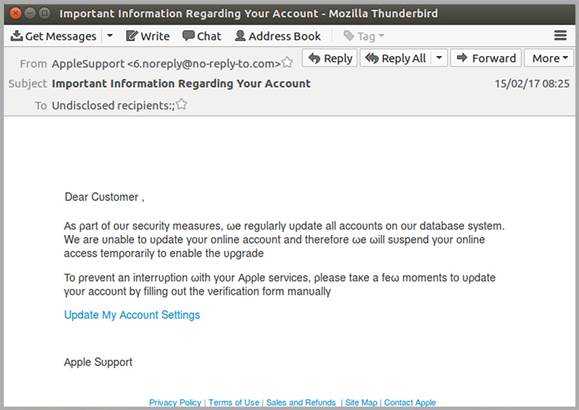
Apple users beware. A phishing scam is going around in an attempt to get your Apple ID and password. And it uses a clever trick. Cloud email and web security service, MailGuard has found a phishing attack where the message has changed font characters to bypass filtering products.
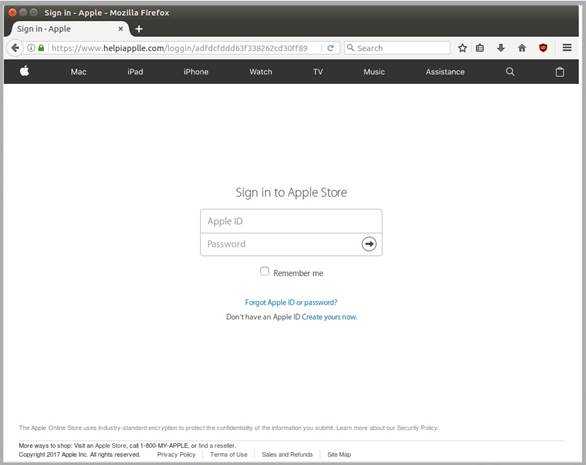
The message claims that an update is being done on the Apple systems and to avoid interruption in service, you need to log in and “verify” your account information. If the link inside the message is clicked, a very authentic-looking Apple login page appears. Unfortunately, any information that is entered goes right to the scammers, who want to get your iCloud data, to make purchases on your account, or potentially be malicious in some other way.
 A few tips to avoid such things are to ensure you don’t click on links or attachments that arrive in your email inbox unexpectedly. If you’re having a conversation at the water cooler and a colleague mentions a file he or she needs to send you, it’s likely OK to open it once you get it. However, if something from that same colleague just shows up out of the blue with no explanation, you should consider the risk of clicking it. Just to be sure, place a phone call to the sender and make sure it’s legitimate first.
Also, if you’re asked to verify an account or check something in your profile, go directly into your account to do so. Don’t click links. Sometimes, they are real ones, but often they are phishing or intending to get malware onto your system. Use a link you have bookmarked previously that you know is safe, log into your account, and check the details that way.
The message in this scam used a unique method to avoid detection. The authors changed the font of some of the letters to trick anti-phishing and content filters that check for specific phrases like “we will suspend your account” and others that try to trick users into falsely “verifying” their accounts. It used the Greek “p,” “u,” and “w” to make it past those filters.
Another clue it was fake was that the domain had been registered for only a month. Likely it was set up just for the purpose of sending spam.
For banks and credit unions
Share this article with your members
Copy a ready-made summary and link for your newsletter, website or social posts.




