

Mac users beware. A backdoor Trojan is on the loose and spreading via a fake Symantec security blog site. The cybercriminals are using the site to download and install the Proton malware to OSX devices, which manages to gather personal information from infected devices including the administrator password and any other information it determines is valuable.
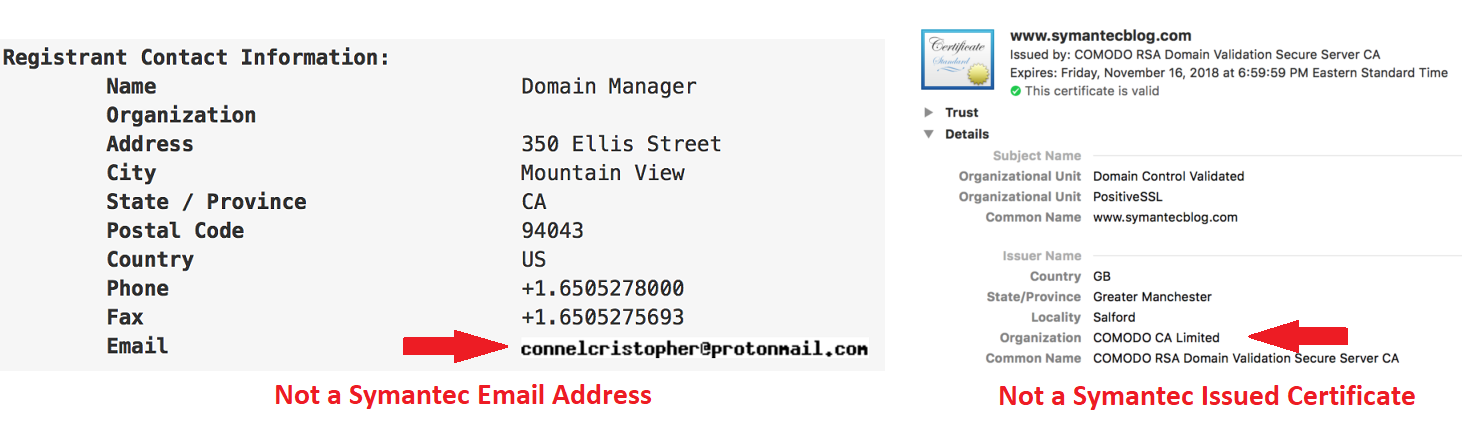
The website used to distribute this was done exceptionally well, making it difficult to determine if it is the actual site Symantec uses. It was registered exactly like Symantec’s domain registration for its blog site, except the email address used to register the domain was not a Symantec address. The other clue is on the certificate itself, it was issued by COMODO and not Symantec's own certificate authority.
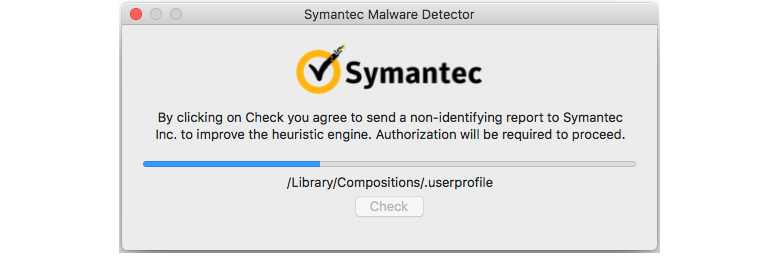
The Proton malware is disguised in a fake product the thieves are calling “Symantec Malware Detector.” This is not a real Symantec product. It will ask for administrator rights to the device it’s trying to infect. If they are granted, it will show a “status bar” to make the user believe it’s scanning the system. Unfortunately, that is just a ruse. It’s really installing the malware.
Apple has revoked the security certificate for the fake site, but that doesn’t mean this has stopped. It’s expected to continue on its merry way.
 This serves as a reminder to be very careful when typing website addresses into browsers. Hackers take advantage of domain jacking, which is exactly what happened here. They used a legitimate site to trick users into going to theirs instead. Often, they will register websites with names that are very close, as is what happened here, or take advantage of people making typos (typosquatting). For example, they may use the letter next to the one in the actual site, hoping the typist will not notice until it’s too late. They may also register sites with names that appear to be the real ones by using the number 1 to represent a lower case “L,” for example.
Whenever possible, use previously bookmarked website addresses that you know are safe. If you type something into the address bar, be very careful not to mistype the name. Review it before pressing the “enter” or “return” key. When using the search functions, be absolutely sure the link really is where you want to click before doing so. Another method for infecting devices is called a drive-by browser attack. This can occur just by visiting a malicious site, even if for the briefest moment. Malware can be downloaded without you having any idea what happened.
For banks and credit unions
Share this article with your members
Copy a ready-made summary and link for your newsletter, website or social posts.




