One thing hackers sometimes don’t lack is creativity and this latest scam involving iPhones helps prove that point. This latest vishing scam (phishing via phone) leaves iPhone owners scratching their heads when faced with a call from Apple, and even more curious wondering how Apple ended up on their phone contact list in the first place. It’s a recent vishing scam in the growing number of hacks involving smartphones, be they iPhone or Android. Buckle your seatbelts because smartphone hacking continues to get better and more effective. This latest iPhone vishing scam is proof of just how clever they can be.
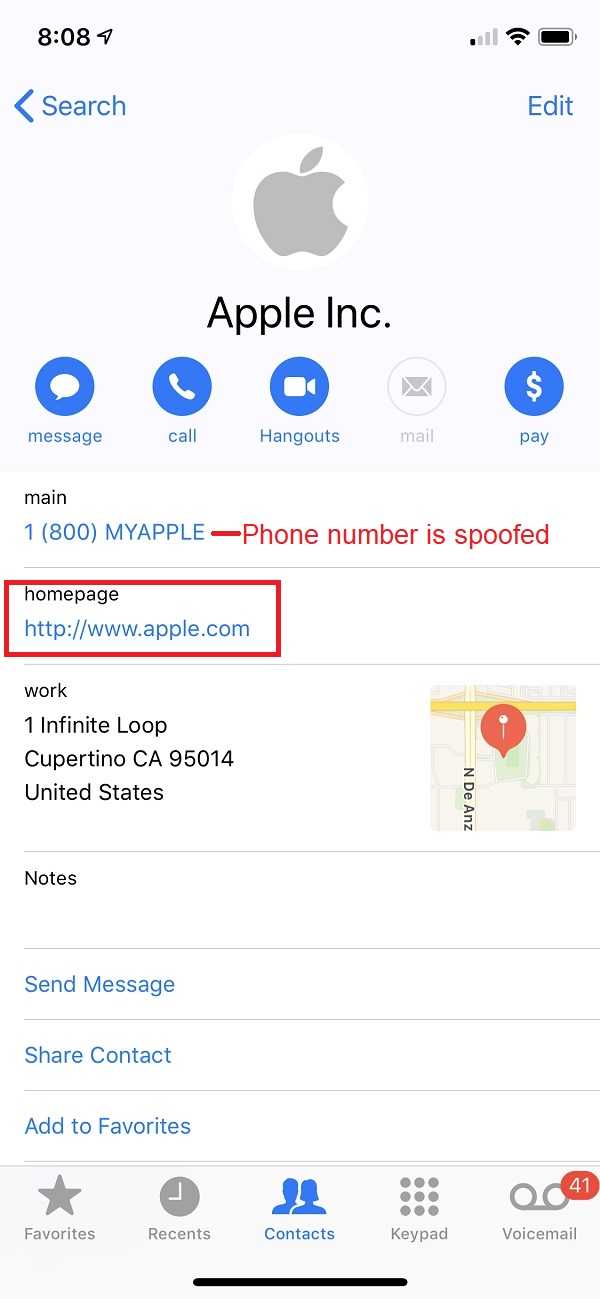 This latest iPhone scam goes to the lengths of spoofing “Apple Inc.” in the call list, even installing the fake contact in users’ phones without them being any the wiser. The Apple contact appears very legitimate–it’s anything but. The spoof screen pops up with everything correct about Apple’s physical address and main phone number. The web address for Apple, though, had a very common tactic that hackers use. The website for Apple was listed as http://apple.com. Savvy sleuths will notice the “s” missing from “http”–a small but very important clue to the entire thing being a scam. This vishing call, like all the others, has a sense of urgency about it. The caller asks the recipient questions about sensitive information about their account, also requiring them to “verify” other information. In other words, the vishing caller gets all the data they need for identity theft. From there, they drain bank accounts, make purchases and anything else they can think of doing with your money–all without you having a clue.
What is Spoofing? It is just a clever way for a cybercriminal to impersonate and display a legitimate phone number on your caller ID whether it's a landline or mobile. The software programs that accomplish this are cheap and widely used.
How the iPhone vishing scam works is by gaining the trust of the smartphone owner from the outset. It’s not the first time this “trust” scam is used–just ask the very long list of victims who put their trust in phone calls that seemed very legitimate. Bogus calls from banks, credit providers, credit monitoring services and many more have left, and continue to leave, many vishing victims none the wiser. They continue to get more elaborate and laser-targeted. Like most hacking scams, vishing calls use urgency and other emotions, getting the victims to give up personal data they otherwise would not do.
 It’s important to remember that any entity asking to verify account numbers, mother’s maiden name, and/or your address is very likely phishing for your information. When in doubt, hang up and go to the official website for a phone number to call back. Never use website URLs or phone numbers the fake caller provides you–they are bogus and always part of the hack. Tell the true entity what you have just experienced and they’ll be able to verify if the call was legitimate or not. Remember, never give sensitive information over the phone without first verifying who is asking for it–it’s well worth the effort.
For banks and credit unions
Share this article with your members
Copy a ready-made summary and link for your newsletter, website or social posts.