Email phishing now has an evil twin. Google Calendar’s 1.5 billion users are at risk in the latest scam to hit the immensely popular app. Kaspersky Lab recently discovered Calendar users are being hit with the same phishing tactics that hackers love to target inboxes with. The twist this time uses Google Calendar to spread phishing messages by having them pop-up as calendar appointments. The goal of this latest spam intrusion is hitting users where it hurts most by stealing their financial data and possibly their identities.
The Google Calendar feature being exploited is the ability for others to create a calendar event, inviting random users and sending recipients an automatic notification. The invitation includes a link to a phishing website in the notification. A short line like “There’s a money transfer in your name” and “You’ve received a cash reward” is used for the calendar event attention-getter.
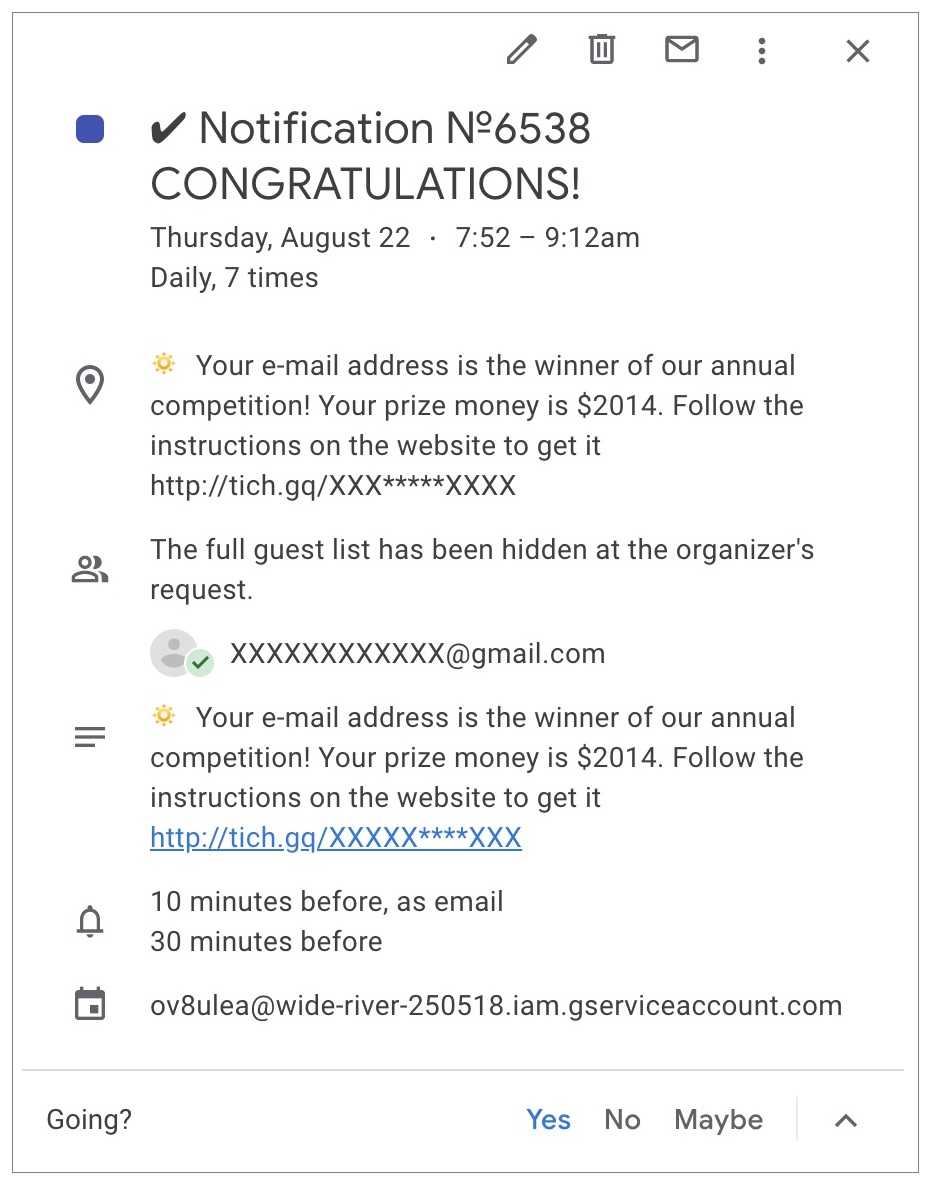 This scam requires the user to fill out a form to claim their money, but not before entering credit card info and personal data first. And as with phishing emails, clicking and following the link down the rabbit hole inevitably leads to stolen money and/or a stolen identity. Experts believe this “calendar phishing” is particularly dangerous because they appear in a trusted and familiar app where users least expect to be phished and can easily be caught off guard.
There are two important steps users can take to stop their Google Calendar from this threat. The first is to disable the default setting allowing anyone to send calendar events and notifications. Doing so will stop both the events and notifications.
The second is applying the same security smarts used against email phishing toward bogus Google Calendar events. Pay close attention to a title that sounds too good to be true, has an urgent action needed, or tugs on your emotions in any way. Hackers are notorious for incorrect spelling and bad grammar, which should be a huge red flag. If you’re asked to send money to “cover expenses” for winning a prize, it just doesn’t make sense to do that. Similarly, never provide financial or personal information, as that is the big-ticket item hackers are ultimately after. Overall, remember if it doesn’t pass the smell test in any way, smell no further and either ignore or delete the Google Calendar appointment. We know hackers don’t let up and neither should you.
For banks and credit unions
Share this article with your members
Copy a ready-made summary and link for your newsletter, website or social posts.